Read Connector and Lighting Diagrams
- Identify connector circuits using the trailer manufacturer's drawing.
- Match connector locations to the drawing's stated viewing direction.
- Trace lighting functions while distinguishing ground, brake, charging, and auxiliary circuits.
- Digital multimeter — Check circuit voltage and ground-path voltage drop; use resistance testing only with power isolated.
- Insulated back-probe leads — Reach accessible connector test points without spreading terminals or bridging adjacent contacts.
- Inspection light — Inspect connector cavities, terminal condition, and molded identification marks.
- Inspection mirror — Inspect the harness side of a connector while keeping its orientation clearly identified.
- Wire labels — Mark verified circuit functions during tracing rather than relying on wire appearance alone.
The electrical connector links the trailer to the tow vehicle. Use the trailer manufacturer's connector information to identify the connector and its wiring orientation rather than treating every diagram as interchangeable.
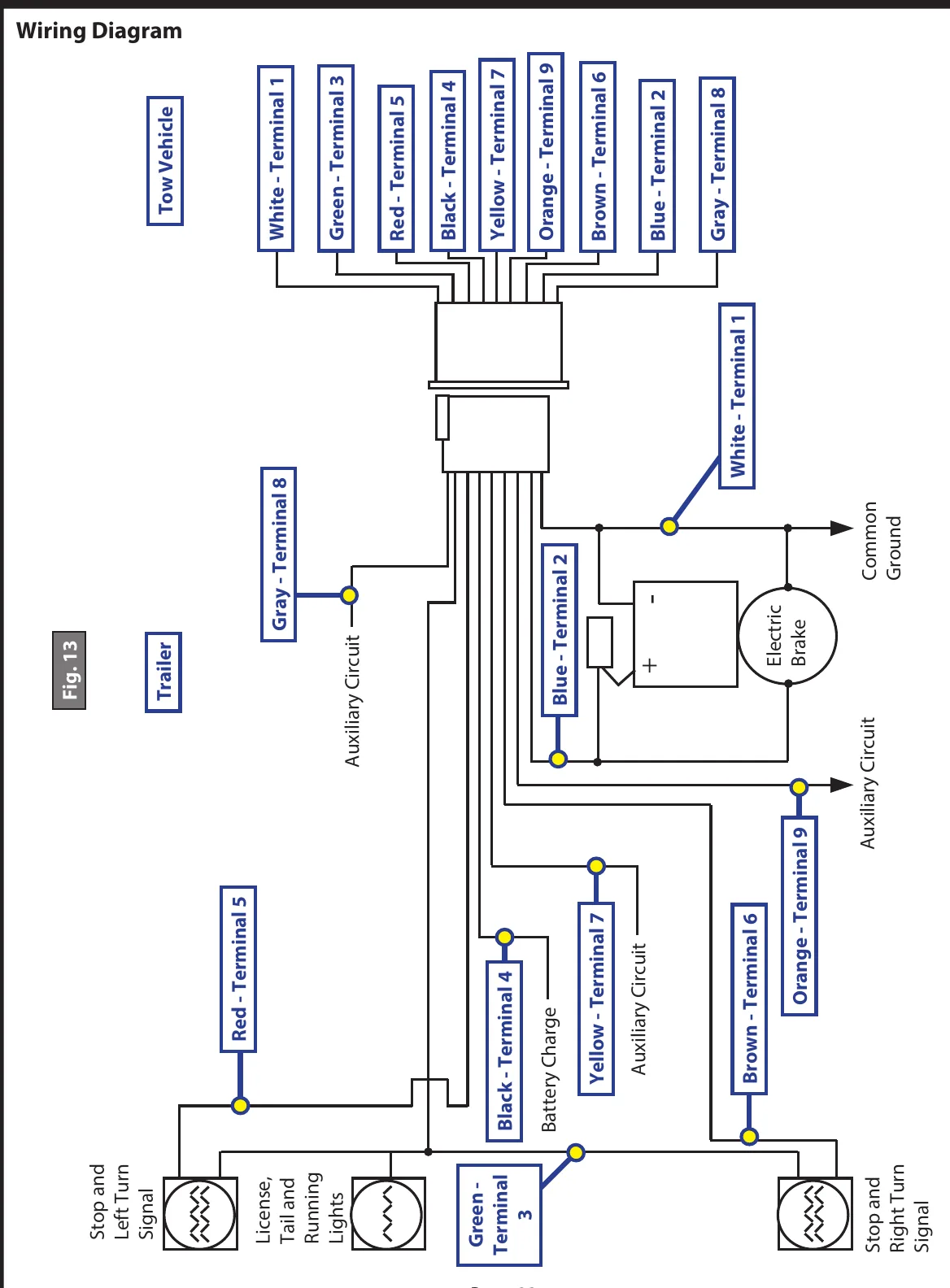
A trailer wiring diagram separates several functions: running and license lights, stop and turn signals, electric brakes, battery charging, auxiliary circuits, and common ground. Read the function labels before following individual wires.
The illustrated lighting arrangement combines the stop signal with the turn signal on each side. The running-light circuit is identified separately from these stop-and-turn circuits.
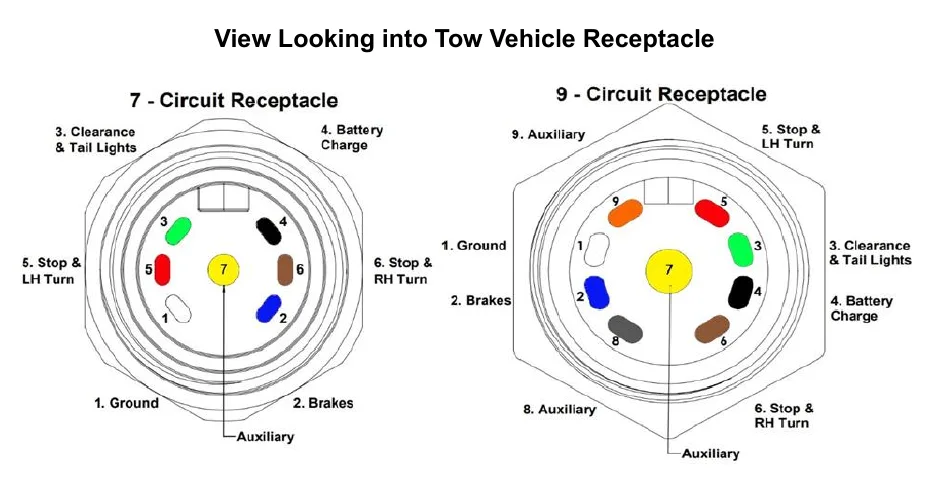
Connector viewing direction matters when locating a circuit. A diagram viewed into the tow vehicle receptacle is a different reference from a diagram described from the wire side of a harness connector; use the perspective stated on the applicable drawing.
How It Works
Read the reference before tracing
Start with the trailer manufacturer's connector information and identify the connector shown. A view into the tow vehicle receptacle is not the same reference as a view from the wire side of a harness connector. Match the actual connector orientation to the stated perspective before assigning functions to terminals.
Separate functions before following wires
The diagram distinguishes running and license lights, stop and turn signals, electric brakes, battery charging, auxiliary circuits, and common ground. In the illustrated arrangement, each side combines its stop and turn functions, while the running-light circuit remains separate. Read function labels first so a brake, charging, or auxiliary conductor is not mistaken for a lighting feed.
Ground is part of the operating circuit
A lamp needs a complete current path, including a sound return connection. Resistance at a shared ground can reduce lamp brightness or make functions interact through unintended return paths. Locate the common ground on the applicable drawing, then evaluate the actual connection under operating load.
Step-by-Step Procedure
0/6 doneFigures
Diagnostic Chart
| Symptom | Check | Spec / Expected | Likely cause & fix |
|---|---|---|---|
| Terminal locations appear reversed compared with the drawing. | Confirm the connector identity, then compare the actual viewing position with the perspective stated on the drawing. | Use the applicable manufacturer's connector drawing and its stated viewing direction. | The tow vehicle receptacle view has been confused with the harness connector wire-side view, or an unrelated drawing is being used. Basis: Bostail 8K Axle Manual |
| Running lights operate, but a stop-and-turn function does not. | Trace the affected side's stop-and-turn function independently of the running-light circuit. | The illustrated arrangement combines stop and turn on each side and identifies running lights separately. | Tracing only the working running-light circuit leaves the affected stop-and-turn path unverified. Basis: Bostail 8K Axle Manual |
| Several lamps are dim or change behavior when another lighting function operates. | Inspect the shared ground connections and check ground-path voltage drop with the affected lights operating. | Use applicable manufacturer test criteria; this lesson supplies no electrical acceptance limits. | A loose or corroded ground can restrict return current and allow unintended return paths through other loads. Basis: General shop practice |
| A terminal thought to supply lighting is labeled for another function. | Recheck the function labels and distinguish electric-brake, charging, and auxiliary circuits before continuing. | Identify circuits by their labeled functions on the applicable connector information. | A terminal was assigned by assumption instead of by the manufacturer's function labels and viewing direction. Basis: Bostail 8K Axle Manual |
At the Bay: Diagnose the Case
CASE 1 / 4
Terminal locations appear reversed compared with the drawing.
- Test
- Compare
- Correct
Select the next check
Basis: Bostail 8K Axle Manual. A likely cause is a hypothesis; confirm it with the applicable service procedure before repair.
Common Bay Mistakes
- ✕ Substituting an unrelated connector drawing.
- ✕ Ignoring whether the drawing shows the mating face or wire side.
- ✕ Treating running lights and stop-and-turn lights as the same circuit.
- ✕ Performing resistance tests on an energized circuit.
Quick Check
Practice only — not scored.
Plan the Service Sequence
Planning practice only. Follow the applicable manufacturer's instructions, employer safety program and qualified supervision on real equipment.
Plan the first action. Compare the service steps with the bay mistakes.
Hands-on: Test Bench Practice
Symptom: Healthy trailer. Learn what good readings look like.
Tap a point to place the red probe.
Good system: ~12.6 V at pins, 3.2 Ω across a 12×2-inch magnet (unplugged), 3.0 A per magnet at 12 V full gain, and at least 10.5 V at the magnet — the chart values from the axle manuals.
Hands-on: Shop Test Equipment
IPA #9107B Electric Brake Force Meter
Plugs into the truck's 7-way socket on a 25 ft cable; simulates a trailer load and shows controller output on 10 blue LEDs
🛠 Equip your bay for this test →Symptom: Customer wants the truck checked before buying a trailer.
Spec limits used
- 1–10, each 1.0–1.5 V — Gain LEDs (IPA #9107B manual, p.5)
- 15 s — Max time holding brake pedal (IPA #9107B manual, p.4)
- set-up step 5 — Connect the 9-pin only after the engine is running (IPA #9107B manual, p.3)
- hold brake pedal during ECU detection — 2016–2017 'Trailer Connected' not shown (IPA #9107B manual, p.3)
- faulty brake control module or relay — ECU light never lights on a vehicle with a controller (IPA #9107B manual, p.5)
Simulated readings for practice. Always follow the manufacturer's procedure and values on a real trailer.
Hands-on: Wire-Trace Overlay
Pin 2 · Blue
Electric brakes
- Left and right brake magnets
- Breakaway switch output
Check points
- Two brakes draw about 6.0 A (3.0 A per magnet) at 12 V full gain.
- Unplugged: 3.2 Ω per magnet; at least 10.5 V at each magnet under load.
Common failures
- Open magnet: about half the expected current and a pull to one side.
- Shorted magnet: very low resistance and controller overload.
- Wire chafed where it drops to the axle.
Colors shown are the most common RV harness colors; makers vary — always verify against the trailer's wiring diagram.
Source: Bostail 8K Axle Manual — 14-18