Diagnose and Synchronize the Basic Wireless Remote
- Identify receiver wiring and expected command outputs.
- Separate power and communication faults using indicators and measurements.
- Perform synchronization and distinguish it from cloning.
- Digital multimeter — Check receiver supply, ground integrity and commanded output voltage.
- Insulated back-probe leads — Measure connected circuits without spreading terminals or shorting adjacent contacts.
- DC clamp ammeter — Check output and system current against the documented ratings.
- Inspection light — Inspect connector identification, terminal condition and Micro USB plug orientation.
- Wheel chocks — Help prevent trailer movement while preparing for remote testing.
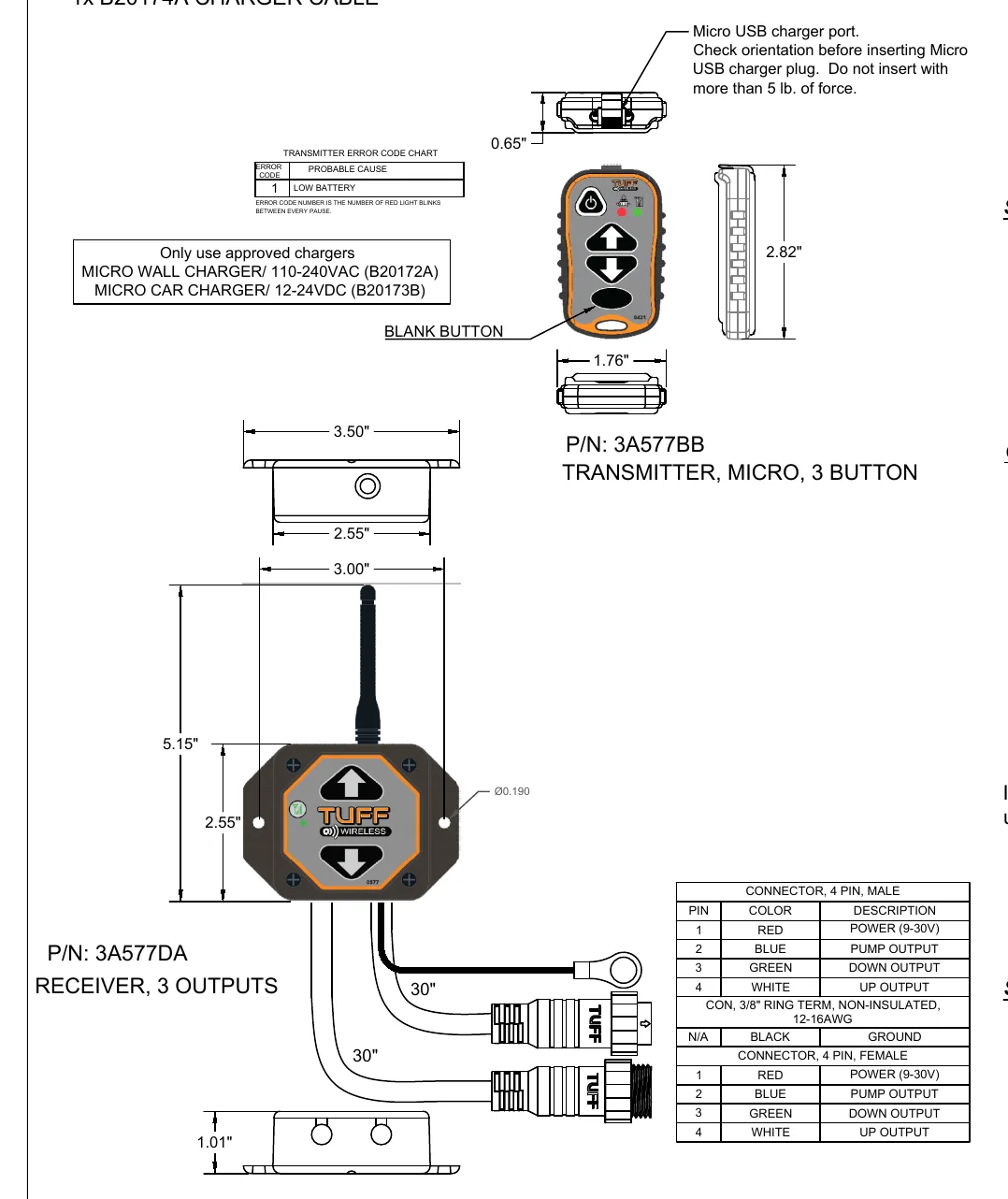
The first remote instruction sheet documents a receiver with separate pump, down and up outputs. Its connector table assigns red to power, blue to pump, green to down, white to up and a separate black lead to ground. Use that table rather than transferring the wired-hand-control color assignments to the wireless receiver.
For this remote, ordinary UP and DOWN commands also activate the pump output, while the blank button activates DOWN alone. Rapid green blinking indicates communication; slow green blinking indicates no communication. A red charging indicator changes to steady green when charging is complete, and charging takes longer with the transmitter turned on.
KTI specifies holding POWER for at least 2 seconds to turn this transmitter on, automatic shutdown after 15 minutes without button presses and a red low-battery indication once per second. The receiver supply is 9–30 V DC and each sourcing output is rated 5 A, with a 20 A system maximum. These values apply to this example and vary by maker.
Synchronization links a replacement transmitter with a receiver. Begin with both off, hold transmitter POWER for more than 10 seconds until the LEDs blink, release it, and then turn on the receiver. Completion is indicated when only the transmitter's green LED begins blinking rapidly. This is the KTI timing for the documented remote; values vary by maker.
Cloning instead gives another transmitter the original transmitter's ID. With both transmitters and the receiver off, hold the original transmitter's POWER for 10 seconds until its LEDs blink, then release it. On the additional transmitter, hold UP, DOWN and POWER until both LEDs blink. After green blinking appears on both, turn both off and synchronize one to the receiver. To unclone, start with transmitter and receiver off, hold UP, DOWN, BLANK and POWER until the LEDs toggle, release, press any button for a new ID and synchronize again. The KTI timing is source-specific; values vary by maker.
How It Works
Receiver wiring and output logic
Use the wireless receiver table: red is power, blue is pump, green is down, white is up and the separate black lead is ground; do not substitute wired-hand-control color assignments. Ordinary UP and DOWN commands also activate the pump output, while BLANK activates DOWN alone. A sourcing output supplies positive voltage to its load, so a poor supply or ground connection can prevent reliable operation even when communication is established.
Indicators, power and charging
Rapid green blinking indicates communication and slow green blinking indicates no communication; hold POWER for at least 2 seconds to turn this transmitter on. The documented KTI transmitter shuts down after 15 minutes without button presses and signals low battery with a red indication once per second. During charging, the red indicator changes to steady green when complete; charging takes longer with the transmitter on, and an approved charger, correct Micro USB orientation and an insertion force not exceeding 5 lb are required.
Synchronization versus cloning
Synchronization links a replacement transmitter to a receiver: with both off, hold transmitter POWER for more than 10 seconds until the LEDs blink, release POWER, turn on the receiver and wait until only the transmitter's green LED blinks rapidly. Cloning copies the original transmitter's ID: with both transmitters and the receiver off, hold original POWER for 10 seconds until its LEDs blink and release, hold UP, DOWN and POWER on the additional transmitter until both LEDs blink, then after green blinking appears on both, turn both off and synchronize one to the receiver. Only one cloned transmitter may be on at a time; to unclone, start with transmitter and receiver off, hold UP, DOWN, BLANK and POWER until the LEDs toggle, release, press any button for a new ID and synchronize again; these timings are specific to the documented KTI remote.
Step-by-Step Procedure
0/5 doneDocumented Remote Values — Values Vary by Maker
| Receiver supply | KTI first-sheet remote: 9–30 V DC. |
| Output rating | KTI first-sheet remote: 5 A per sourcing output; 20 A system maximum. |
| Automatic shutdown | KTI first-sheet remote: after 15 minutes without button presses. |
| Charging-plug insertion limit | KTI: do not exceed 5 lb of insertion force. |
Figures
Diagnostic Chart
| Symptom | Check | Spec / Expected | Likely cause & fix |
|---|---|---|---|
| Receiver does not respond to commands. | Confirm transmitter power, then measure receiver supply between red and the separate black ground lead. Inspect the supply and ground connections before attempting synchronization. | KTI first-sheet remote: 9–30 V DC. Hold transmitter POWER for at least 2 seconds to turn it on. | Transmitter left off, missing receiver power, poor ground or supply outside the documented range. Basis: KTI-Remote-Kit-Instructions |
| Transmitter shows slow green blinking. | Confirm receiver power and perform the synchronization sequence with both devices initially off. Release transmitter POWER after the LEDs blink, then turn on the receiver and observe the completion indication. | Hold POWER for more than 10 seconds; completion is indicated when only the transmitter's green LED blinks rapidly. | No communication; the replacement transmitter may not yet be synchronized to the receiver. Basis: KTI-Remote-Kit-Instructions |
| Pump does not run with BLANK, or command behavior appears incorrect. | With the trailer secured and the movement area clear, compare blue pump, green down and white up outputs during each command. If voltage is present but the function fails, continue downstream circuit and load checks rather than repeatedly synchronizing. | UP activates up and pump; DOWN activates down and pump; BLANK activates DOWN alone. KTI first-sheet remote: 5 A per sourcing output; 20 A system maximum. | No pump output with BLANK is expected; other mismatches may result from incorrect wiring, an output fault or a downstream circuit fault. Basis: KTI-Remote-Kit-Instructions |
| Communication is indicated, but an output or connected load works intermittently. | Inspect for loose, corroded or damaged terminals. Compare supply and output behavior while the affected load is commanded, keeping personnel clear of moving equipment. | Use the applicable equipment documentation for allowable voltage drop and load requirements. | Connection resistance can reduce voltage under load and generate heat; damaged wiring can interrupt an otherwise valid command. Basis: General shop practice |
At the Bay: Diagnose the Case
CASE 1 / 4
Receiver does not respond to commands.
- Test
- Compare
- Correct
Select the next check
Basis: KTI-Remote-Kit-Instructions. A likely cause is a hypothesis; confirm it with the applicable service procedure before repair.
Common Bay Mistakes
- ✕ Do not transfer wired-hand-control colors to the wireless receiver.
- ✕ Do not mistake steady charging green for rapid communication blinking.
- ✕ Do not leave cloned transmitters on together or treat cloning as synchronization.
- ✕ Do not test movement with personnel exposed; secure the trailer and support raised equipment appropriately.
Quick Check
Practice only — not scored.
Plan the Service Sequence
Planning practice only. Follow the applicable manufacturer's instructions, employer safety program and qualified supervision on real equipment.
Plan the first action. Compare the service steps with the bay mistakes.
Hands-on: Shop Test Equipment
Hydraulic Pressure & Relief Gauge
0–5,000 psi gauge on the pump pressure port, DC clamp meter, battery voltmeter
🛠 Equip your bay for this test →Symptom: Routine check before a customer pickup.
Spec limits used
- 3,200 psi — Primary relief (factory preset) (KTI Hydraulics Troubleshooting Manual 2019)
- 1,500 psi — Secondary relief, circuit 111 (KTI Hydraulics Troubleshooting Manual 2019)
- below 9 V — Low-voltage alarm (KTI remote)
- illustrative only — Motor current & voltage drop (General shop practice)
Simulated readings for practice. Always follow the manufacturer's procedure and values on a real trailer.
Source: KTI-Remote-Kit-Instructions — 1