Program Hoist and Winch Pump Participation
- Match pump participation to the approved powered or gravity operating mode.
- Program hoist and winch outputs without confusing programming with cloning.
- Use wiring assignments and indicators to separate output faults from communication faults.
- Digital multimeter — Check receiver power, ground integrity and commanded pump output using the documented connector assignments.
- Back-probe leads — Access connector circuits for electrical checks without damaging terminals or shorting adjacent contacts.
- Insulated hand tools — Access receiver connections with power isolated.
- Inspection light — Identify wire colors, inspect connector condition and observe receiver indicators.
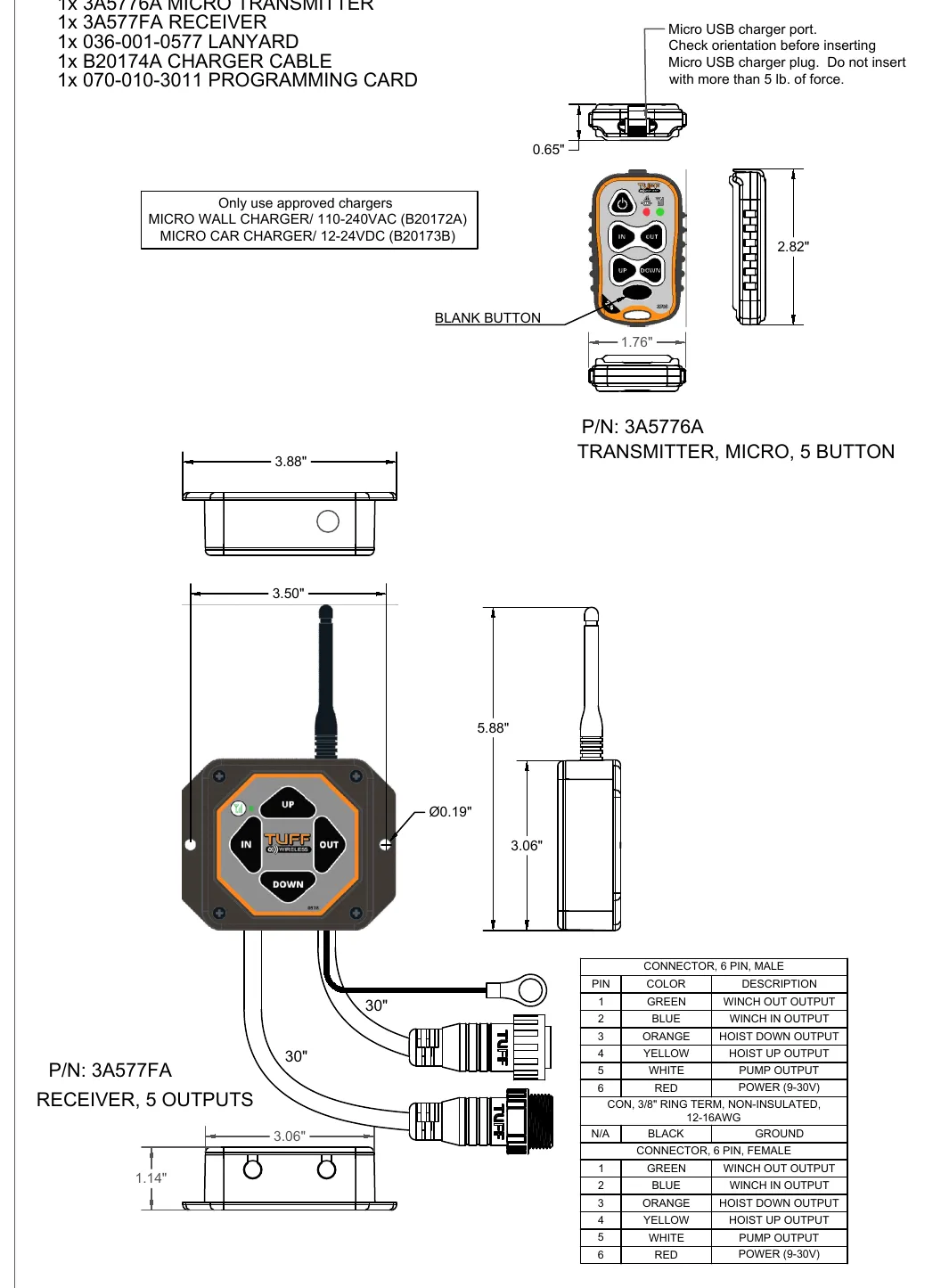
The second remote instruction sheet adds winch and hoist functions. Its connector table assigns green to winch out, blue to winch in, orange to hoist down, yellow to hoist up, white to pump and red to power, with black as the separate ground. These assignments differ from the basic remote.
The documented receiver defaults to POWER DOWN and POWER OUT, so the pump participates in those operations. GRAVITY DOWN removes pump activation from hoist down. GRAVITY OUT leaves pump activation with winch in but not winch out.
For hoist programming, begin with the receiver off and transmitter on. KTI specifies holding HOIST UP and HOIST DOWN for five seconds until red blinking starts, then releasing them and powering the receiver. Select HOIST DOWN for Gravity Down or HOIST UP for Power Down. A steady receiver green light for three seconds confirms acceptance. Values vary by maker.
Winch programming follows the corresponding source sequence: receiver off, transmitter on, then hold OUT and IN until programming is entered. Apply receiver power and select OUT for Gravity Out or IN for Power Out. KTI specifies the same five-second entry hold and three-second steady-green acceptance indication; values vary by maker.
Cloning uses IN, OUT and POWER on the additional transmitter, rather than the basic remote's UP and DOWN combination. Begin with both transmitters and the receiver off; hold the original transmitter's POWER until its LEDs blink, then release it. After entering cloning on the additional transmitter and observing green blinking on both, turn both off and synchronize one. Uncloning uses IN, OUT, BLANK and POWER, followed by any button to select a new ID and then synchronization. KTI specifies a 10-second original-transmitter cloning hold; values vary by maker.
Use the indicators to separate communication and battery issues from output programming. KTI specifies green blinking twice per second during communication and once per second without communication, while a red blink once per second indicates low transmitter battery. These rates are source-specific and vary by maker; charging finishes with a steady green indicator.
How It Works
Pump participation is an operating-mode choice
The documented receiver defaults to POWER DOWN and POWER OUT, which activate the pump during those commands. GRAVITY DOWN removes pump activation from hoist down; GRAVITY OUT removes it from winch out while retaining pump activation for winch in. Removing a pump command does not establish that the equipment is suitable for gravity operation, so confirm the approved hydraulic arrangement before changing modes.
Programming follows a controlled power sequence
For the documented KTI hoist sequence, begin with the receiver off and transmitter on, hold HOIST UP and HOIST DOWN for five seconds until red blinking starts, then release the buttons and power the receiver. Select HOIST DOWN for Gravity Down or HOIST UP for Power Down; a steady receiver green light for three seconds confirms acceptance. Winch programming uses OUT and IN for entry, followed by OUT for Gravity Out or IN for Power Out, with the same KTI entry and acceptance indications; values vary by maker.
Communication, identity and output configuration are distinct
Programming changes pump participation, whereas cloning and synchronization concern transmitter identity and communication with the receiver. On this remote, additional-transmitter cloning uses IN, OUT and POWER rather than the basic remote's UP and DOWN combination, and only one cloned transmitter may be on at a time. A communication indication establishes a radio link, not correct wiring or correct pump participation.
Step-by-Step Procedure
0/5 doneDocumented Programming Values — Values Vary by Maker
| Programming entry hold | KTI second-sheet remote: 5 seconds on the corresponding pair of function buttons. |
| Programming acceptance | KTI second-sheet remote: receiver green LED steady for 3 seconds. |
| Communication indication | KTI second-sheet remote: green LED blinks 2 times per second. |
| No-communication indication | KTI second-sheet remote: green LED blinks 1 time per second. |
Figures
Diagnostic Chart
| Symptom | Check | Spec / Expected | Likely cause & fix |
|---|---|---|---|
| The pump runs during hoist down when gravity operation is intended. | Confirm that gravity operation is approved for the equipment, then repeat the hoist programming sequence and select HOIST DOWN. | GRAVITY DOWN removes pump activation from hoist down. KTI specifies five seconds for entry and three seconds of steady receiver green for acceptance; values vary by maker. | The receiver may still be at its POWER DOWN default, or the previous programming attempt may not have been accepted. Basis: KTI-Remote-Kit-Instructions |
| The pump operates during winch in but not during winch out. | Compare the intended operating mode with the programmed selection before treating the missing pump command as an electrical failure. | GRAVITY OUT retains pump activation for winch in but not winch out. Select OUT for Gravity Out or IN for Power Out during winch programming. | This behavior is expected in GRAVITY OUT; it indicates a configuration mismatch only if powered winch out is required. Basis: KTI-Remote-Kit-Instructions |
| Remote commands are not producing the expected response. | Observe transmitter indicators before changing output programming, and distinguish a missing communication link from a low battery. | KTI specifies green blinking twice per second during communication and once per second without communication. A red blink once per second indicates low transmitter battery; charging finishes with steady green. Values vary by maker. | A communication or battery problem may prevent commands from reaching the receiver, independently of pump participation settings. Basis: KTI-Remote-Kit-Instructions |
| The wrong function responds, or the pump does not follow the selected mode. | Isolate power before inspecting connections. Compare wire assignments with this remote's connector table rather than the basic remote's table. | Green is winch out, blue is winch in, orange is hoist down, yellow is hoist up, white is pump and red is power; black is the separate ground. | Basic-remote assignments may have been substituted, or a function lead may be connected to the wrong circuit. Basis: KTI-Remote-Kit-Instructions |
At the Bay: Diagnose the Case
CASE 1 / 4
The pump runs during hoist down when gravity operation is intended.
- Test
- Compare
- Correct
Select the next check
Basis: KTI-Remote-Kit-Instructions. A likely cause is a hypothesis; confirm it with the applicable service procedure before repair.
Common Bay Mistakes
- ✕ Do not assume that disabling the pump makes gravity operation safe.
- ✕ Do not substitute basic-remote wire assignments or cloning buttons.
- ✕ Do not leave another cloned transmitter on during use.
- ✕ Do not test motion with personnel in the load or cable travel path.
Quick Check
Practice only — not scored.
Plan the Service Sequence
Planning practice only. Follow the applicable manufacturer's instructions, employer safety program and qualified supervision on real equipment.
Plan the first action. Compare the service steps with the bay mistakes.
Hands-on: Shop Test Equipment
Hydraulic Pressure & Relief Gauge
0–5,000 psi gauge on the pump pressure port, DC clamp meter, battery voltmeter
🛠 Equip your bay for this test →Symptom: Routine check before a customer pickup.
Spec limits used
- 3,200 psi — Primary relief (factory preset) (KTI Hydraulics Troubleshooting Manual 2019)
- 1,500 psi — Secondary relief, circuit 111 (KTI Hydraulics Troubleshooting Manual 2019)
- below 9 V — Low-voltage alarm (KTI remote)
- illustrative only — Motor current & voltage drop (General shop practice)
Simulated readings for practice. Always follow the manufacturer's procedure and values on a real trailer.
Source: KTI-Remote-Kit-Instructions — 2