Install Fixed-Caliper Pads and Retaining Hardware
- Install pads with the correct working-face orientation.
- Assemble retaining hardware using the covered fixed-caliper sequence.
- Verify locknut adjustment and production-specific clip placement.
- Floor jack, jack stands, and wheel chocks — Lift and support the trailer safely and prevent unintended movement.
- Socket and wrench set — Remove the wheel and retaining hardware, fit temporary lug nuts, and assemble the retaining bolt and locknut.
- Caliper piston retraction tool — Retract the pistons sufficiently to admit the replacement pads without damaging the piston contact surfaces.
- Torque wrench — Remount the wheel using its applicable torque procedure; do not substitute a guessed torque for the retaining-locknut rotation instruction.
- Inspection light — Inspect the rotor, hardware, pad orientation, hole alignment, and spring and clip seating.
- Brake-dust-rated HEPA vacuum — Control lining dust during removal and inspection; do not disperse dust with compressed air.
The covered fixed-caliper pad procedure removes the retaining pin and pads while preserving the retaining hardware for reassembly. First support the trailer safely, remove the wheel, disconnect actuation, verify no hydraulic pressure, and confirm free rotor rotation. Observe the lining-dust precautions throughout.
Inspect the rotor and mounting hardware before installing the new pads. Retract the caliper pistons enough to admit the pads between the pistons and rotor. Temporary lug nuts hold the rotor against the hub face during assembly and are removed once the pads are assembled.
The inner and outer pads are interchangeable in this procedure, but their working faces are not. Install the friction lining toward the rotor and the steel backing toward the pistons. Align the pad holes with the caliper holes before inserting retaining hardware.
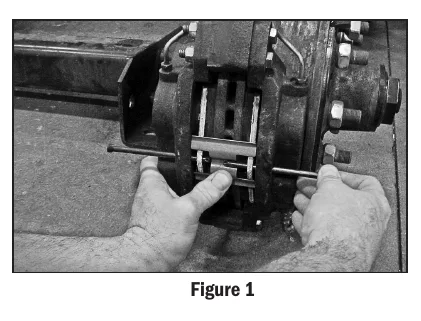
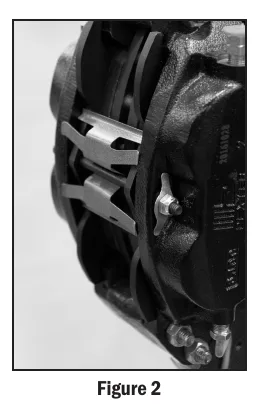
The retaining-bolt sequence uses a bolt in each caliper half to position the pads, then advances the outboard bolt through both pads while pushing the other bolt out. The anti-rattle spring is held against the pads with its center pressed toward the rotor. Install the spring tension clip and locknut as shown; Dexter specifies 3–4 full locknut rotations after contact with the clip for these covered 6K, 7K, and 8K brakes. Values vary by maker, and the source provides a separate clip-placement reference for brakes produced after June 2018.
How It Works
Safe preparation and pad orientation
Support the trailer, remove the wheel, disconnect actuation, verify no hydraulic pressure, and confirm free rotor rotation before disturbing the pads, while observing lining-dust precautions. The inner and outer pads are interchangeable in this procedure, but the friction lining must face the rotor and the steel backing must face the pistons. This orientation places the intended friction material at the braking surface and lets the backing distribute piston force.
Alignment and retaining-hardware assembly
Inspect the rotor and mounting hardware, retract the pistons sufficiently, and hold the rotor against the hub face with temporary lug nuts while positioning the pads. Align the pad and caliper holes, use a bolt in each caliper half to position the pads, and advance the outboard bolt through both pads while pushing the other bolt out. Hold the anti-rattle spring against the pads with its center pressed toward the rotor; correct alignment avoids using the bolt to force misaligned parts together.
Spring preload and version-specific instructions
The spring and tension clip control unwanted pad movement, so their seating matters as well as locknut adjustment. For the covered Dexter brakes, the pad-retaining locknut instruction is 3–4 full rotations past contact with the spring tension clip; values vary by maker. After June 2018: consult Figure 2 for spring tension clip placement, and do not import the instruction to discard old anti-rattle springs from a clip-on pad kit into this fixed-caliper procedure.
Step-by-Step Procedure
0/7 doneDexter covered fixed-caliper pad values; values vary by maker
| Pad-retaining locknut | 3–4 full rotations past contact with the spring tension clip |
| Production-version figure reference | After June 2018: consult Figure 2 for spring tension clip placement |
Figures
Diagnostic Chart
| Symptom | Check | Spec / Expected | Likely cause & fix |
|---|---|---|---|
| Replacement pads will not enter the space between the pistons and rotor. | Confirm actuation is disconnected and hydraulic pressure is absent, then check piston retraction and whether the rotor is held against the hub face. | Retract the pistons sufficiently to admit the pads; use temporary lug nuts to hold the rotor against the hub during assembly. | Insufficient piston retraction or a rotor displaced from the hub face can obstruct pad installation. Basis: LDServiceOnline |
| Retaining bolt stops before passing through the pads. | Inspect alignment of the pad and caliper holes and verify that the outboard bolt is advancing while displacing the other positioning bolt. | Align the holes before inserting retaining hardware; advance the outboard bolt through both pads while pushing the other bolt out. | Misaligned holes or an incorrect positioning-bolt sequence can block the retaining bolt. Basis: LDServiceOnline |
| Anti-rattle spring or tension clip does not seat as expected. | Compare spring orientation and clip position with the applicable source figures; verify the production version and locknut contact point. | Press the spring center toward the rotor. Apply 3–4 full rotations past contact with the spring tension clip. After June 2018: consult Figure 2 for spring tension clip placement. | Incorrect spring orientation, wrong production-version clip placement, or adjustment measured from the wrong contact point can leave the assembly incorrectly loaded. Basis: LDServiceOnline |
| Rotor cannot rotate freely during the preparation check. | With the trailer safely supported and actuation isolated, investigate residual brake application, mechanical interference, and hub or bearing resistance before proceeding. | Do not invent a drag allowance; resolve unexplained binding before continuing assembly. | Residual hydraulic force, contacting components, or bearing trouble can resist rotation independently of pad-retaining hardware. Basis: General shop practice |
At the Bay: Diagnose the Case
CASE 1 / 4
Replacement pads will not enter the space between the pistons and rotor.
- Test
- Compare
- Correct
Select the next check
Basis: LDServiceOnline. A likely cause is a hypothesis; confirm it with the applicable service procedure before repair.
Common Bay Mistakes
- ✕ Interchangeable inner and outer pads still require friction lining toward the rotor.
- ✕ Do not discard fixed-caliper springs merely because a clip-on kit says to discard its springs.
- ✕ Do not treat locknut rotations as a torque value or apply them to another maker.
- ✕ Remove temporary lug nuts before reconnecting actuation and remounting the wheel using the applicable torque procedure.
Quick Check
Practice only — not scored.
Plan the Service Sequence
Planning practice only. Follow the applicable manufacturer's instructions, employer safety program and qualified supervision on real equipment.
Plan the first action. Compare the service steps with the bay mistakes.
Hands-on: Test Bench Practice
Symptom: Healthy trailer. Learn what good readings look like.
Tap a point to place the red probe.
Good system: ~12.6 V at pins, 3.2 Ω across a 12×2-inch magnet (unplugged), 3.0 A per magnet at 12 V full gain, and at least 10.5 V at the magnet — the chart values from the axle manuals.
Hands-on: Shop Test Equipment
Hydraulic Pressure & Relief Gauge
0–5,000 psi gauge on the pump pressure port, DC clamp meter, battery voltmeter
🛠 Equip your bay for this test →Symptom: Routine check before a customer pickup.
Spec limits used
- 3,200 psi — Primary relief (factory preset) (KTI Hydraulics Troubleshooting Manual 2019)
- 1,500 psi — Secondary relief, circuit 111 (KTI Hydraulics Troubleshooting Manual 2019)
- below 9 V — Low-voltage alarm (KTI remote)
- illustrative only — Motor current & voltage drop (General shop practice)
Simulated readings for practice. Always follow the manufacturer's procedure and values on a real trailer.
Source: LDServiceOnline — 41-43