Read Mounting and Torque Instructions
- Select mounting hardware from the applicable coupler instructions.
- Match torque requirements to bolt identification and installation conditions.
- Interpret weld callouts by location and verify attachment condition.
- Torque wrench — Apply the verified application-specific torque using a wrench with an appropriate operating range.
- Sockets and combination wrenches — Fit mounting hardware securely and hold mating hardware during tightening.
- Caliper — Check bolt diameter against the mounting instructions rather than inferring bolt size from the wrench opening.
- Inspection light — Illuminate bolt-head markings, mounting locations, and weld locations.
- Wire brush — Remove loose debris obscuring hardware markings without treating cleaning as proof that threads meet the specified lubrication condition.
Coupler capacity depends on correct attachment hardware. The supplied coupler instructions require the exact bolt size, grade, and quantity specified for the installation. Replacing hardware with the same grade is also required; a general torque chart does not establish which mounting bolts an application needs.
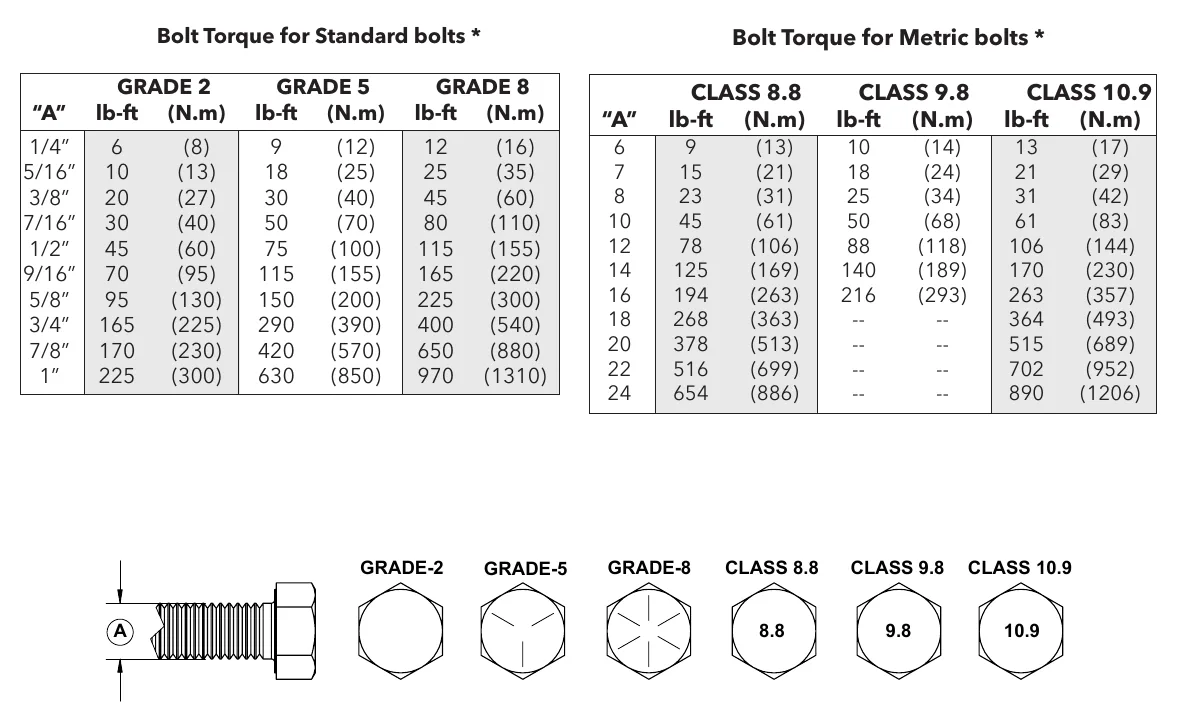
Read a torque chart by matching both bolt size and grade or class. Head markings identify grade or class. As a source-specific example, Demco lists 150 lb-ft for a 5/8-inch Grade 5 standard bolt under the chart's stated conditions. Torque values vary by maker and application.
The chart's conditions are part of the specification. Its figures apply to non-greased, non-oiled threads and heads unless otherwise specified. Demco calls for a 5% increase when locking elements are used. That adjustment belongs to this source's instructions and must not be treated as universal.
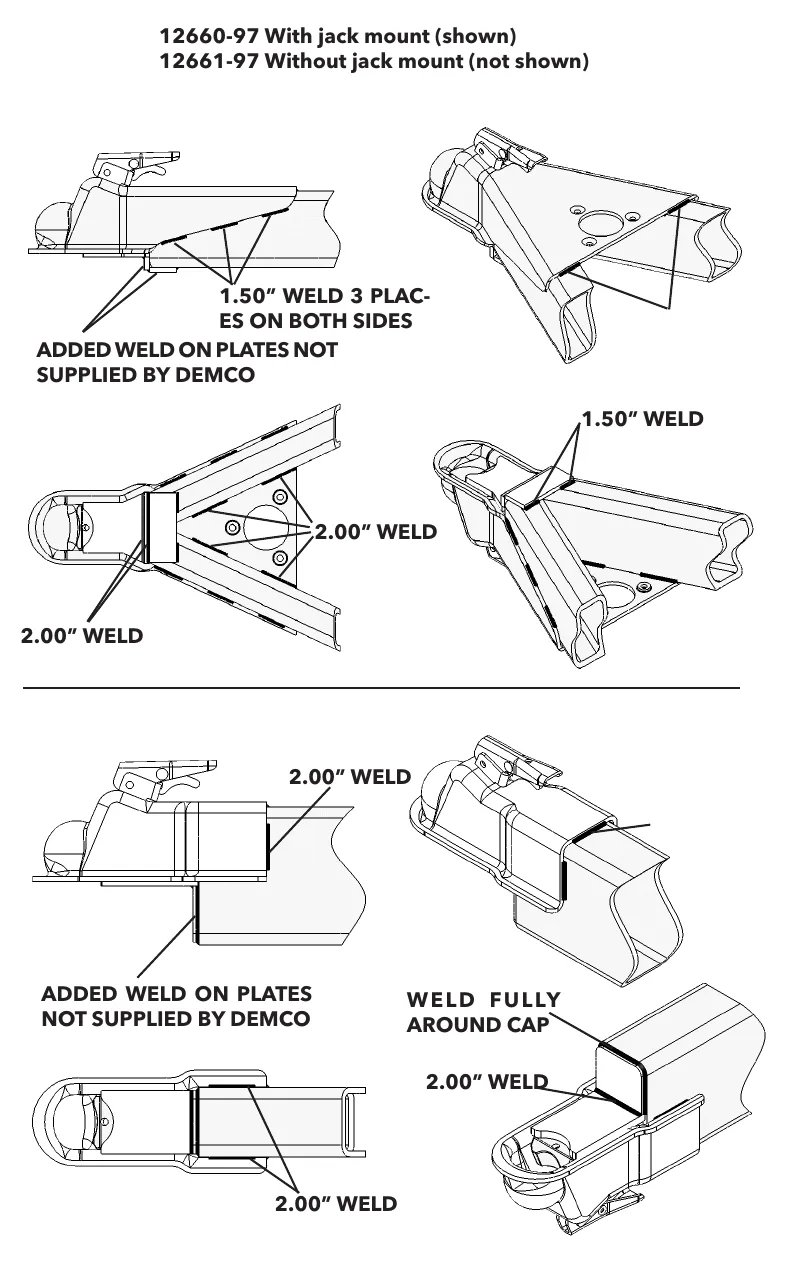
Welded attachments also require the applicable installation information. The supplied weld illustration identifies particular coupler configurations and places different callouts at different locations. Read the drawing as a location-specific instruction rather than applying a single weld callout everywhere, and check hardware tightness periodically.
How It Works
Hardware selection establishes the attachment
Identify the coupler configuration, then find its specified bolt size, grade, and quantity before consulting a torque chart. The attachment must transfer coupler loads into the trailer structure; incorrect hardware can invalidate the stated capacity even when tightened to a chart value. Head markings identify grade or class, and replacement hardware must retain the specified grade.
Torque depends on conditions
Torque produces bolt tension through a process strongly affected by friction at the threads and beneath the turning head or nut, so lubrication changes the relationship between wrench torque and clamping force. Demco lists 150 lb-ft for a 5/8-inch Grade 5 standard bolt with non-greased, non-oiled threads and heads unless otherwise specified, and calls for a 5% increase when locking elements are used. These are source-specific instructions, not universal rules; a specific application instruction takes precedence over a general chart.
Drawings and continued inspection matter
For welded attachments, match the actual coupler configuration to the applicable illustration and follow each callout at its indicated location. Different locations can have different attachment requirements, so copying a weld callout across the assembly can produce an incorrect installation. Check hardware tightness periodically as directed rather than assuming the original tightening remains adequate indefinitely.
Step-by-Step Procedure
0/8 doneSource-specific chart examples; values vary by maker and application
| Standard bolt torque example | Demco: 5/8-inch Grade 5 bolt, 150 lb-ft for non-greased, non-oiled threads and heads unless otherwise specified. |
| Locking-element adjustment | Demco: increase chart torque by 5% when locking elements are used. |
Figures
Diagnostic Chart
| Symptom | Check | Spec / Expected | Likely cause & fix |
|---|---|---|---|
| The coupler has unidentified or mixed mounting hardware. | Identify the configuration, retrieve its mounting instructions, and compare bolt size, head markings, and installed quantity with the requirements. | Use the exact specified bolt size, grade, and quantity; replace hardware with the same grade. | Hardware may have been substituted or selected from a torque chart instead of the application instructions. Basis: Demco-Coupler-Manual-1 |
| A selected torque value is supported only by a general chart. | Verify bolt size and grade or class, then look for an application-specific exception before approving the torque. | Demco: 5/8-inch Grade 5 bolt, 150 lb-ft for non-greased, non-oiled threads and heads unless otherwise specified. | A chart entry may have been mistaken for a universal mounting specification. Basis: Demco-Coupler-Manual-1 |
| Threads are oily or locking elements are fitted, but the selected torque does not address those conditions. | Read the applicable thread, head, and locking-element instructions before tightening; do not improvise a lubrication correction. | The chart applies to non-greased, non-oiled threads and heads unless otherwise specified. Demco calls for a 5% increase when locking elements are used. | The installer may have read the torque entry without its qualifying conditions. Basis: Demco-Coupler-Manual-1 |
| The same weld instruction has been applied throughout the coupler attachment. | Match the coupler configuration to the drawing and trace each callout to its indicated location. | Apply weld callouts at their specified locations rather than applying a single callout everywhere. | A location-specific illustration may have been interpreted as a general weld requirement. Basis: Demco-Coupler-Manual-1 |
At the Bay: Diagnose the Case
CASE 1 / 4
The coupler has unidentified or mixed mounting hardware.
- Test
- Compare
- Correct
Select the next check
Basis: Demco-Coupler-Manual-1. A likely cause is a hypothesis; confirm it with the applicable service procedure before repair.
Common Bay Mistakes
- ✕ Using a torque chart to choose mounting-bolt size or quantity.
- ✕ Matching bolt diameter while ignoring grade or class.
- ✕ Applying Demco's locking-element adjustment to unrelated instructions.
- ✕ Copying a weld callout to locations it does not identify.
Quick Check
Practice only — not scored.
Plan the Service Sequence
Planning practice only. Follow the applicable manufacturer's instructions, employer safety program and qualified supervision on real equipment.
Plan the first action. Compare the service steps with the bay mistakes.
Source: Demco-Coupler-Manual-1 — 7-10