System Status, Pairing, and Connection Verification
- Identify the correct owner's app and trailer device.
- Complete the connection path appropriate to the device name.
- Verify connection status and safely disconnect pairing.
- Bluetooth-enabled smartphone — Scan the manual's app-selection QR code, run the owner's app, and complete pairing.
- Flashlight — Illuminate the reference device-name label so its text can be read accurately.
- Inspection mirror — Read an awkwardly positioned reference label without removing components.
- Clean soft cloth — Gently remove surface dirt that obscures the reference label without damaging its markings.
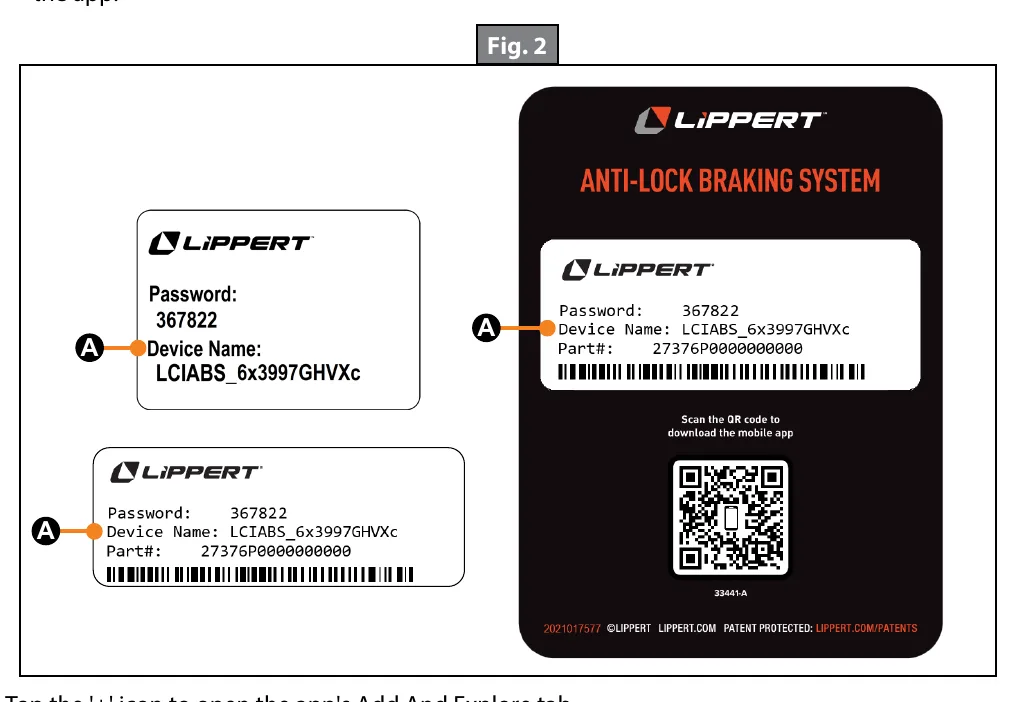
The owner's app provides system status and notifications. Select the appropriate app using the manual's app-selection QR code, enable the phone's Bluetooth, and locate the device-identification information supplied with the trailer.
After accepting the license agreement and signing in or creating an account, compare the app's device name with the reference label. Open Add And Explore and follow the RV Connection prompts.
A connection whose device name begins with LCIABS connects both the RV and ABS in the documented integrated arrangement. Ready beneath the device confirms that connection. A connection beginning with LCIRemote requires the additional Anti-Lock Brakes connection path.
Keep the tow vehicle in Park during pairing. If requested, create a trailer profile with the vehicle and trailer names. To disconnect pairing, use UNPAIR and confirm the choice; if the app has no unpair control, forget the device in the phone's Bluetooth settings.
How It Works
Identify before connecting
The owner's app provides system status and notifications; use the manual's app-selection QR code to select the appropriate app. Enable Bluetooth, locate the supplied device-identification information, and compare the app's device name with the reference label rather than assuming a nearby device belongs to this trailer.
Follow the device-specific connection path
Accept the license agreement, complete the account prompts, then open Add And Explore and follow the RV Connection prompts. A device name beginning with LCIABS connects the RV and ABS in the documented integrated arrangement, with Ready beneath the device confirming that connection. A name beginning with LCIRemote requires the additional Anti-Lock Brakes connection path; RV connection alone does not establish completion of that path.
Maintain a stationary pairing workflow
Keep the tow vehicle in Park throughout the documented pairing procedure and select CONTINUE after successful pairing. If requested, complete the trailer profile using the vehicle and trailer names. To disconnect pairing, select UNPAIR and confirm, or forget the device in the phone's Bluetooth settings if the app has no unpair control.
Step-by-Step Procedure
0/7 doneFigures
Diagnostic Chart
| Symptom | Check | Spec / Expected | Likely cause & fix |
|---|---|---|---|
| The displayed device name does not match the trailer reference label. | Confirm that the app was selected through the manual's app-selection QR code, then compare the displayed name with the supplied device-identification information. | The app's device name must be compared with the reference label before proceeding with the intended trailer connection. | The selected app or device may not be the intended one; resolve the identification mismatch before continuing. Basis: Lippert-Anti-Lock-Braking-System-ABS-Owners-Manual-ABS-Service-Manual-Manual |
| An LCIABS device is listed, but Ready is not displayed beneath it. | Confirm Bluetooth is enabled and follow the RV Connection prompts through Add And Explore while keeping the tow vehicle in Park. | Ready beneath the LCIABS device confirms the documented integrated connection. | The connection has not been confirmed by the documented indicator; a listed device name alone is insufficient. Basis: Lippert-Anti-Lock-Braking-System-ABS-Owners-Manual-ABS-Service-Manual-Manual |
| The LCIRemote RV connection is complete, but ABS access has not been established. | Check whether the additional Anti-Lock Brakes connection prompts were followed. | A connection beginning with LCIRemote requires the additional Anti-Lock Brakes connection path. | The technician may have stopped after establishing the RV connection. Basis: Lippert-Anti-Lock-Braking-System-ABS-Owners-Manual-ABS-Service-Manual-Manual |
| Pairing needs to be disconnected, but the app has no unpair control. | Locate the paired device in the phone's Bluetooth settings and verify its identity before forgetting it. | Use UNPAIR and confirm when available; otherwise forget the device in the phone's Bluetooth settings. | The app does not provide the unpair control used by the primary documented disconnection method. Basis: Lippert-Anti-Lock-Braking-System-ABS-Owners-Manual-ABS-Service-Manual-Manual |
At the Bay: Diagnose the Case
CASE 1 / 4
The displayed device name does not match the trailer reference label.
- Test
- Compare
- Correct
Select the next check
Basis: Lippert-Anti-Lock-Braking-System-ABS-Owners-Manual-ABS-Service-Manual-Manual. A likely cause is a hypothesis; confirm it with the applicable service procedure before repair.
Common Bay Mistakes
- ✕ Selecting a nearby device without checking the reference label.
- ✕ Treating an LCIRemote RV connection as a completed ABS connection.
- ✕ Treating Ready as proof of mechanical brake condition rather than connection confirmation.
- ✕ Moving the tow vehicle out of Park during pairing.
Quick Check
Practice only — not scored.
Plan the Service Sequence
Planning practice only. Follow the applicable manufacturer's instructions, employer safety program and qualified supervision on real equipment.
Plan the first action. Compare the service steps with the bay mistakes.
Hands-on: Shop Test Equipment
ABS Sensor Gap & Blink-Code Scanner
Non-magnetic feeler gauge, AC millivolt meter on the sensor, ECU blink-code button
🛠 Equip your bay for this test →Symptom: Post-repair verification.
Spec limits used
- 1.00–1.75 mm — Wheel-speed sensor air gap (Lippert ABS manual, p.13)
- 068Ah / 0006h — Sensor fault codes (Lippert ABS)
- illustrative only — Sensor AC output while spinning (General shop practice)
Simulated readings for practice. Always follow the manufacturer's procedure and values on a real trailer.
Source: Lippert-Anti-Lock-Braking-System-ABS-Owners-Manual-ABS-Service-Manual-Manual — 3-5