Diagnostic Entry and Supply-Voltage Fault Isolation
- Retrieve and record stored controller faults using the documented diagnostic procedure.
- Distinguish battery and harness supply faults using the correct voltage branches.
- Evaluate active internal and temperature faults before condemning a module.
- Digital multimeter — Measure battery voltage and disconnected main-harness supply voltage for the documented comparisons.
- Battery tester — Assess battery condition before attributing a low-voltage fault to the harness or controller.
- Basic hand tools — Access power connections and disconnect supplies as required by the service procedure.
- Inspection light — Inspect main-harness power connections and identify heat sources around the module.
The service manual uses a diagnostic mobile app to read codes stored in controller memory and states that this app is available for Android devices. Install it, complete its setup, scan the controller QR code, and note all displayed codes. The automatic drive-off test checks brake-magnet and harness continuity at power-up.
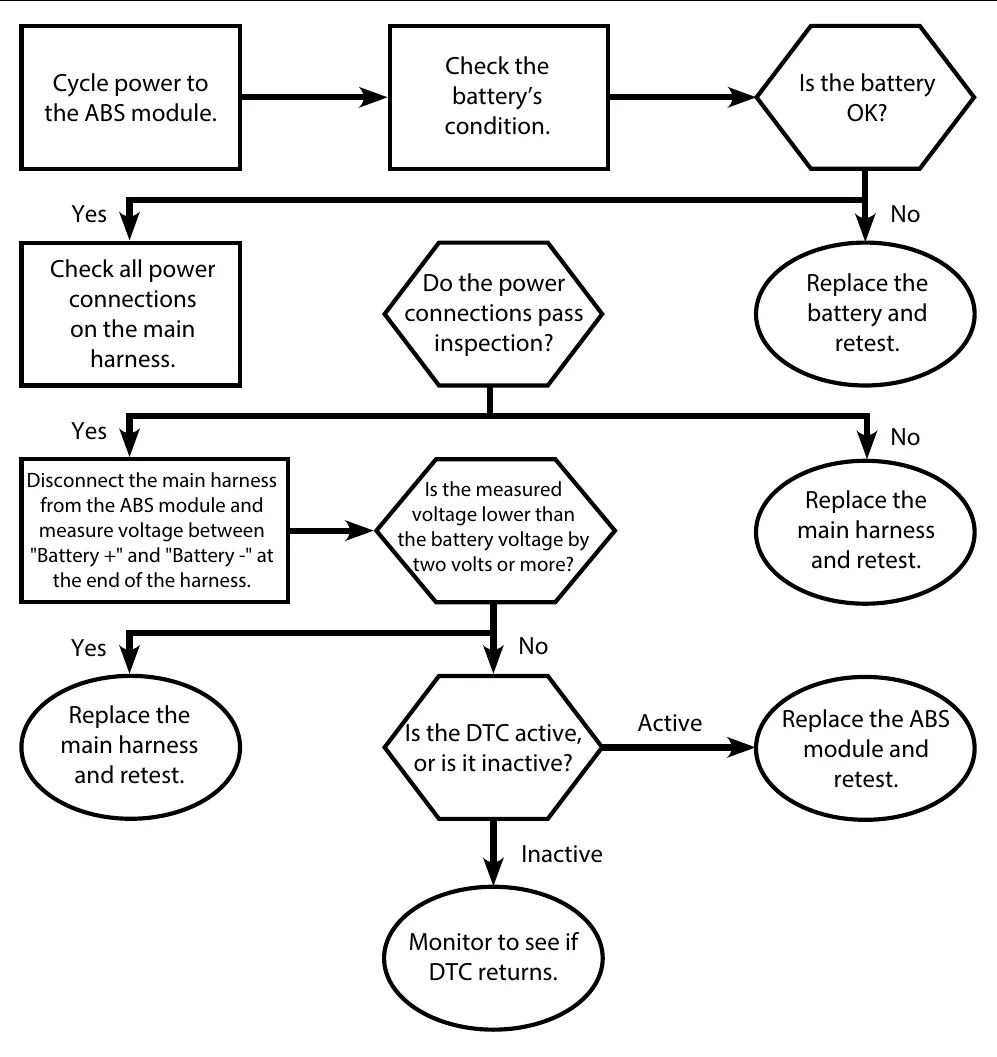
A power cycle requires removal of every power source, including tow-connector, shore, and solar supplies where present. Lippert specifies a 10-second wait before reconnection; values vary by maker. For low voltage, the chart starts with a power cycle, battery-condition assessment, and main-harness power-connection inspection.
Compare the disconnected main-harness supply voltage with battery voltage. Lippert's low-voltage chart uses a drop of 2 volts or more as a harness-replacement branch. Its high-voltage chart distinguishes battery voltage of 16 volts or higher from 30 volts or higher; the higher branch calls for correcting the source and replacing the module. These thresholds vary by maker.
Follow the active-versus-inactive branches rather than replacing a controller solely because a code was stored. For an internal-component fault, power-cycle and replace the module if the fault remains active. For overtemperature, also inspect the module area for heat sources and correct them before evaluating whether the fault remains active.
How It Works
Diagnostic entry and fault status
The manual specifies an Android diagnostic mobile app: install it, complete setup, scan the controller QR code, and record all displayed codes before following the matching chart. A stored code records a detected condition, but the active-versus-inactive branch determines the next action rather than the mere presence of a code. The automatic drive-off test checks brake-magnet and harness continuity at power-up; it does not replace fault-specific diagnosis.
Complete power removal and supply comparison
A valid power cycle removes every power source, including tow-connector, shore, and solar supplies where present, followed by Lippert's specified wait of 10 seconds before reconnection; values vary by maker. Another connected supply can keep the controller energized and prevent the intended reset. Assess battery condition and main-harness power connections before comparing disconnected main-harness supply voltage with battery voltage, because poor connections can restrict current flow and reduce delivered voltage.
Separate source, module, and heat faults
Lippert's high-voltage chart distinguishes battery voltage of 16 volts or higher from 30 volts or higher; the higher branch calls for correcting the source and replacing the module, and thresholds vary by maker. For an internal-component fault, power-cycle and replace the module if the fault remains active. For overtemperature, also inspect and correct nearby heat sources before evaluating active status, because external heating can impair operation without establishing an internal failure.
Step-by-Step Procedure
0/8 doneLippert diagnostic values; values vary by maker
| Power-cycle wait | 10 seconds with all power sources disconnected |
| Low-voltage harness comparison | Harness supply 2 volts or more below battery voltage |
| High battery-voltage branches | 16 volts or higher; 30 volts or higher |
Figures
Interactive Demonstration
Planning practice only. Follow the applicable manufacturer's instructions, employer safety program and qualified supervision on real equipment.
Plan the first action. Compare the service steps with the bay mistakes.
Diagnostic Chart
| Symptom | Check | Spec / Expected | Likely cause & fix |
|---|---|---|---|
| Low-voltage fault is reported. | Follow the low-voltage chart: power-cycle, assess battery condition, inspect main-harness power connections, and compare disconnected main-harness supply voltage with battery voltage. | Harness supply 2 volts or more below battery voltage is Lippert's harness-replacement branch; values vary by maker. | Battery condition or main-harness power connections may explain the fault; the documented comparison identifies the harness-replacement branch. Basis: Lippert-Anti-Lock-Braking-System |
| High-voltage fault is reported. | Measure battery voltage and follow the corresponding high-voltage branch, proceeding to the harness-voltage branch only if directed. | 16 volts or higher; 30 volts or higher. Lippert's higher branch requires correcting the source and replacing the module; values vary by maker. | Excessive source voltage can expose the module to damaging electrical stress; a generic reset does not correct the source. Basis: Lippert-Anti-Lock-Braking-System |
| Internal-component fault is stored. | Remove every power source, perform the specified power cycle, and determine whether the fault remains active. | 10 seconds with all power sources disconnected. Replace the module if the internal-component fault remains active. | A persistent active internal-component fault meets the documented module-replacement condition; a stored code alone does not. Basis: Lippert-Anti-Lock-Braking-System |
| Overtemperature fault is reported. | Perform the chart's power cycle, inspect the module area for heat sources, correct those sources, and reevaluate fault status. | Correct surrounding heat sources before evaluating whether the fault remains active; retest after correction and monitor faults that become inactive. | A nearby heat source may contribute to module overheating and must be addressed before judging the remaining fault. Basis: Lippert-Anti-Lock-Braking-System |
At the Bay: Diagnose the Case
CASE 1 / 4
Low-voltage fault is reported.
- Test
- Compare
- Correct
Select the next check
Basis: Lippert-Anti-Lock-Braking-System. A likely cause is a hypothesis; confirm it with the applicable service procedure before repair.
Common Bay Mistakes
- ✕ Disconnecting only the battery while another supply remains connected.
- ✕ Treating a stored inactive fault as proof of controller failure.
- ✕ Applying Lippert voltage thresholds to another maker without verification.
- ✕ Replacing a module without correcting excessive supply voltage or surrounding heat sources.
Quick Check
Practice only — not scored.
Plan the Service Sequence
Planning practice only. Follow the applicable manufacturer's instructions, employer safety program and qualified supervision on real equipment.
Plan the first action. Compare the service steps with the bay mistakes.
Hands-on: Shop Test Equipment
ABS Sensor Gap & Blink-Code Scanner
Non-magnetic feeler gauge, AC millivolt meter on the sensor, ECU blink-code button
🛠 Equip your bay for this test →Symptom: Post-repair verification.
Spec limits used
- 1.00–1.75 mm — Wheel-speed sensor air gap (Lippert ABS manual, p.13)
- 068Ah / 0006h — Sensor fault codes (Lippert ABS)
- illustrative only — Sensor AC output while spinning (General shop practice)
Simulated readings for practice. Always follow the manufacturer's procedure and values on a real trailer.
Source: Lippert-Anti-Lock-Braking-System — 3-6